UA-9726592-1
Showing posts with label home router. Show all posts

Wednesday, July 20, 2011

Home Network Security 101

Your children can get in trouble at both school and home with data networks using both the Internet and cell phones. Many children have got into major problems at school with sexting images over cellphone networks. Kids can also get into a world of hurt on the Internet using peer to peer  (P2P) file sharing networks such as FrostWire and BitTorrent.
Frostwire logo

FrostWire follows a line of Windows P2P software as Morpheus, Grokster, Kazaa and Limewire which ceased operations after being sued by the Motion Picture Association of America (MPAA) or Recording Industry Association of America. (RIAA). Some of these companies  were closed down by the courts and others morphed into legitimate companies.

Limewire was recently closed down in federal court which probably caused crocodile tears in police departments acrsoss the US. Limewire is notorious for pornography. About 30 per cent of the Limewire downloads were porn and a certain per cent of that was illegal porn that pedophiles swap and the police try to find.

Although Limewire is gone, it has been replaced by Frostwire that uses the exact same TCP ports. If your child has Frostwire on their PC, you should be concerned. Frsotwire can also download the faster Torrents.

The police crawl the Gnutella P2P network which provides one of the backbones for P2P file sharing. This means the police can see any P2P files that your child downloads. If your child is continually downloading files, it may be just matter of time before he or she will gets the attention of the police, or the MPAA if your child is downloading copy righted movies

According to Wikipedia, Gnutella is a large peer-to-peer network which, at the time of its creation, was the first decentralized peer-to-peer network of its kind, leading to other, later networks adopting the model. It celebrated a decade of existence on March 14, 2010 and has a user base in the millions for peer-to-peer file sharing.

In June 2005, Gnutella's population was 1.81 million computers and increased to more than three million nodes by January 2006. 

In another article, Rightardia mentioned that file sharing should be disabled for P2P programs like Frostwire. This will prevent the police from crawling your child's file sharing folder. However, if your child is downloading Torrent files, these files have embedded trackers that do not require a shared folder for other P2P users including the police to acquire the file your child had just downloaded.

You can disable ports on your home router or cable modem to disable P2P file sharing and to impede the downlaod of torrents.

You can also block file sharing on your home router or cable modem. Here is the way an SMC firewall is configured to block P2P sharing on the LAN side of a network;

click to enlarge

Rightardia would recommend that you contact you cable provider and have them put the cable modem into bridge mode. Try to get the SMCD3GN cable modem and wireless router replaced if you have one. Brighthouse has disabled many of the advanced feature of this cable modem.

Once your cable modem is in bridge mode he cable company will no longer be able to intrude into your home network, but you will have to configure a firewall and/or wireless router that you now control.

This is necessary because the major cable providers are cooperating with both the MPAA and the RIAA. When Rightardia installed Peerblock software, Wirehead noticed that trackers were showing up on TCP ports that the Brighthouse SMCD3GN firewall should have been blocking.
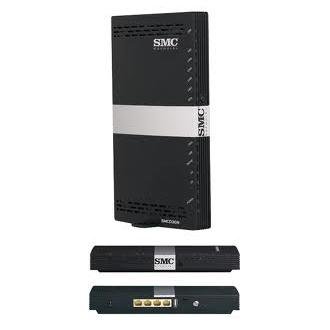
BrightHouse has crippled the SMCD3GN router 

However, the ports weren't being blocked and the firewall did not allow any TCP ports to be blocked on the incoming WAN side of the network. According to BrightHouse, it is not necessary to block incoming WAN port because all of these ports are already blocked.

Peerblock indicated otherwise after we started a file sharing program. All we can assume is that BrightHouse has opened these TCP ports because it has been co-opted by the MPAA and the RIAA to avoid lawsuits and allow corporate and government trackers into home networks.

Wireless is now a dicey proposition because hackers have been able to break into WPA2 wireless routers that use the Advanced Encryption Standard (AES) encryption. This means wireless routers that are correctly configured are no longer secure. Hackers are using video card graphic processing units (GPU) to break the AES encryption.

In the past, a hacker could sit nearby outside your home with a Pringle can antenna to break into your home's wireless network. They can now break into home with advanced antenna from more than a mile away.

If you aren't using wireless in your home, it is best to disable it.

Subscribe to the Rightardia feed: http://feeds.feedburner.com/blogspot/UFPYA   Netcraft rank: 6627 http://toolbar.netcraft.com/site_report?url=http://rightardia.blogspot.com Creative Commons License
Rightardia by Rightard Whitey of Rightardia is licensed under a Creative Commons Attribution 3.0 Unported License.
Permissions beyond the scope of this license may be available at rightardia@gmail.com.

Monday, August 10, 2009

5 things you can do with your home router


HANNOVER: It wasn't long ago that the humble home router led an uneventful existence. Its task was to distribute incoming data packets to attached computers.

It was also entrusted with blocking the occasional packet off the Internet if it hadn't been ordered by one of the PCs. But in recent years the diminutive network boxes have morphed into tidy little communication hubs combining network connectivity, a WLAN access point, and often even a telephone system as well.

"That saves a lot of electricity and jumble of cables," says Johannes Endres from Hanover-based computer magazine c't.

Routers offer many other unexpected functions as well

Here's a rundown of a few. An analogue phone connection has typically meant being stuck with just one phone line. One cost-effective way to work with multiple lines using your own phone number is to use a router with a built-in Internet telephony function (VoIP) and a corresponding switching box. Many external VoIP devices can be connected to one of the Ethernet ports as well.

"It's significantly cheaper than a home ISDN connection, although it also doesn't offer the same range of functions," Endres says. A VoIP provider can be selected as desired. You should first check whether your contract with your ISP already includes VoIP service - such as a flat rate for all calls within your national landline network.


Many routers also possess a USB port for connecting a printer as a print server or an external hard drive which can be used as a file server.

Those devices are then available to all computers on the home network. "That solution requires less electricity than using a computer as a network server. It is slower, though," Endres explains. For those who only occasionally swap data, the solution is often sufficient.

Users who need to access data on their home network while on the go can use dynamic DNS (DynDS) and the port forwarding function on the router. DynDNS allows the router to be addressed worldwide via a single host name. The port forwarding function makes it possible to access a specific PC or hard drive on your home network from any Internet-ready computer worldwide.

There are some software solutions for remote access as well such as Logmein and VNC.

"That can be a big help if you're on a business trip and find out that you've forgotten some key files at home," Endres notes.

Modern routers make it easy to configure WLAN devices like laptops. The old system of manually entering long encryption keys has been replaced with a process that connected the device into the WLAN system at the press of a button or key, explains Thomas Jell, of networking hardware maker Netgear. This is possible because Wireless Access Points are now integrated into home routers.

Other options include the use of PIN numbers or integration by physically inserting a USB stick that undertakes the configuration. The standard behind those functions is known as Wi-Fi Protected Setup (WPS).

The new generation of routers takes great pains to prevent security holes. "In theory the increased range of functions means that there are more opportunities to attack the devices, but our practical tests show that it really doesn't work that way," Endres says. T

This is true as long as home users turn on wireless security by using Wi-Fi Protected Access WPA and WPA-II keys. The Wired Equivalent Privacy (WEP) keys on older routers are considered insecure and any hacker can break them in 5 minutes or less.

Routers typically come with most supplementary functions switched off; the user must actively switch them on. "Make sure that no functions are switched on that you don't really use and understand," Endres warns.


It is very important that the home router firewall be enabled to keep you network secure. The home user should also create a strong password with upper and lower case characters, numbers and special characters to protect the router's configuration.

courtesy: DPA

source: http://infotech.indiatimes.com/Enterprise-IT/5-things-you-can-do-with-your-router/articleshow/4648116.cms

Get 30 days of free traffic analysis simply by going to Web-Stat: http://www.web-stat.com/?id=2955 Subscribe to the Rightardia feed: feeds.feedburner.com/blogspot/IGiu

Improve blog traffic with TrafficG http://trafficg.com/splash/splash01.php?uid=eelder1

Netcraft rank: 19798 http://toolbar.netcraft.com/stats/topsites?s=BE281D838226A4DAC11D0E201A0E#19798