BrightHouse and the other big cable companies have opened their residential networks to avoid lawsuits from the Motion Picture Association of America (MPAA) and Recording Industry Association of America (RIAA).
This means if you or your children are using the Gnutella network or BitTorrent to download movie or music, dozens of government and corporate trackers are monitoring these downloads. Start BitTorrent or Frostwire and after installing PeerBlock. You will be amazed on how many organizations are interested in your home downloads.

With the BrightHouse SMCD3GN routers, all you can do is block Lan side ports to prevent your children from downloading files. BrightHouse does not allow you to block incoming Wan-side TCP ports because it says it already blocks all of them. According to PeerBlock, this is not true
Perrblock suggests that many of these TCP ports are now open for government and industry IT people to monitor your home network.
What can a home Internet user do to get the government and corporations out of your home network? First, buy a good home router.
One web site recommended the D-Link 655. See http://www.firewallguide.com.
Rightardia purchased the more current D-link 825 which provides dual band wireless in the 2.4 and 5 GHZ range. The 5 GHZ band was designed for high speed streaming media like a ROKU streaming media client.
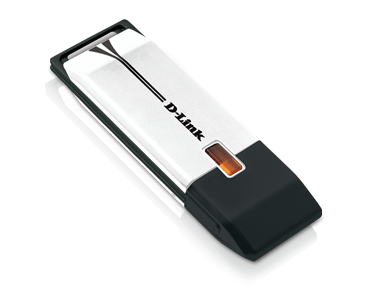
DW_160
If you have the right wireless adapter like the D-Link DWA-160, you can also get access to the 5 GHZ band. Wirehead would expect a a speedier link with a more a limited wireless range in the 5GHZ band.
Once you have the router, flash it with the open source DD-WRT firmware which will provide your home router with many features of a far more expensive router. Although Wirehead had no trouble installing the firmware on the D-Link 825, you can "brick" your router with this open source firmware. Be careful with the f/w upgrade! You don't want to turn your new router into a brick.
We let the upgrade continue for several minutes because we noticed a lot of hard drive activity on the PC we used for the upgrade. Likewise we powered down the router for 5 minutes after the f/w upgrade was complete because the D-Link router had no power button.
The rest of this article will address configuring the D-link 825 using the DD-WRT open source firmware.
The first screen is very important in the configuration.

Leave the WAN interface also identified as Ethernet 1 (E1) disabled. The DD-WRT f/w creates a bridge between the Lan port (E0), the Wan port (E1) and the two wireless ports. By the way, the E0 port and the wireless ports use the same MAC address.
Since your BrightHouse router provides wireless service and the dynamic host configuration protocol (DHCP) in the SMCD3GN router, you need to disable these features on the SMC router.
You don't want the BrightHouse router to provide these duplicate services because it will eventually the SMC router be configured in bridge mode which will turn it back into a cable modem.

In Setup | Networking, a bridge group should be automatically created that briges E1 (WAN), (E0) (Lan) and the two wireless ports. Because of this bridge group, you do not need to configure the Wan port which should be disabled.
Wirehead initially tried to configure the D-Link router with the more conventional Wan port and Lan port but the configuration didn't work. It caused problems with wired connections. Once the Wan port was disabled, the wired connections and DHCP worked correctly.
Wirehead used 192.168.1.3 as the IP address for the D-Link router. This default address used for the Brighthouse router is 192.168.1.1. Since we disabled the WAN port, we didn't need a 192.168.1.2 address. The default address for the D-Link router is 192.168.1.1 You will have to change the D-Link address to avoid an IP conflict witt he BrightHouse router.
The IP address of the router and Ethernet port (E0) are the same. This means that the gateway for any any IP addresses in your Lan should be the IP address of the router or E0 port, not the cable modem's. In the Rightardia router, the gateway IP address was 192.168.1.3. This is the gateway address that should be also be provided by the DHCP server.
The wireless settings had a tendency to revert to the defaults. We sometimes saw a phantom wireless network (DD-WRT) with an excellent signal. Configure the wireless as in the screen below:

Note that in the first router, the SSID broadcast was disabled. This will produce a hidden wireless network that will keep the neighborhood script kiddie out of you network. Use the full channel width for your wireless configuration .
For encryption of wireless security, use AES encryption unless you have older devices that require TKIP. In this case, you can use AES+ TKIP option.
In the Setup | Services menu, telnet is enabled by default. When Wirehead disabled telnet which is usually a good idea, the wireless network stopped working.
At this point the wired and wireless networks are stable and the DHCP server works fine. We like the DD-WRT firmware (f/w). it has many features such as IPTables to block ports. See http://www.dd-wrt.com/wiki/index.php/Port_Blocking
DD-WRT f/w supports hotspots and can gather traffic information. It provides excellent traffic statistics. More importantly, you now have a home network that is more secure.
Of course, the final step is to call BrightHouse and have them put the SMC router into bridge mode. That will get the government and corporations out of your home network.
Also, don't forget to backup the configuration file. You may need it for a rainy day.
Subscribe to the Rightardia feed: http://feeds.feedburner.com/blogspot/UFPYA Netcraft rank: 6627 http://toolbar.netcraft.com/site_report?url=http://rightardia.blogspot.com

Rightardia by Rightard Whitey of Rightardia is licensed under a Creative Commons Attribution 3.0 Unported License.
Permissions beyond the scope of this license may be available at rightardia@gmail.com.


